
// documentation · tradrquant pro
TradrQuant Pro — Confluence Terminal
A rule-based trend, momentum, and structure engine built for traders who want to see why a setup qualifies — not just a colored arrow.
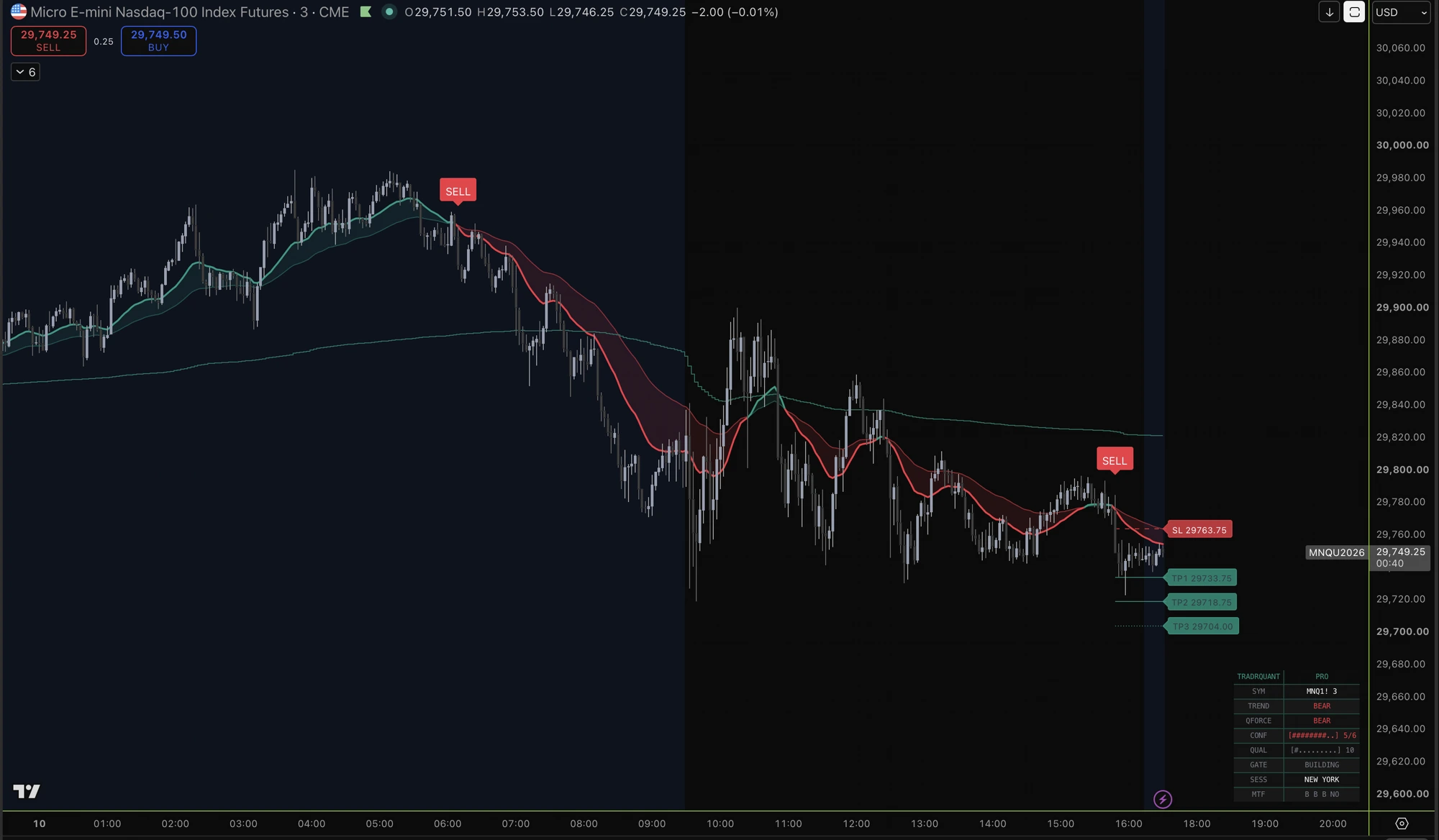
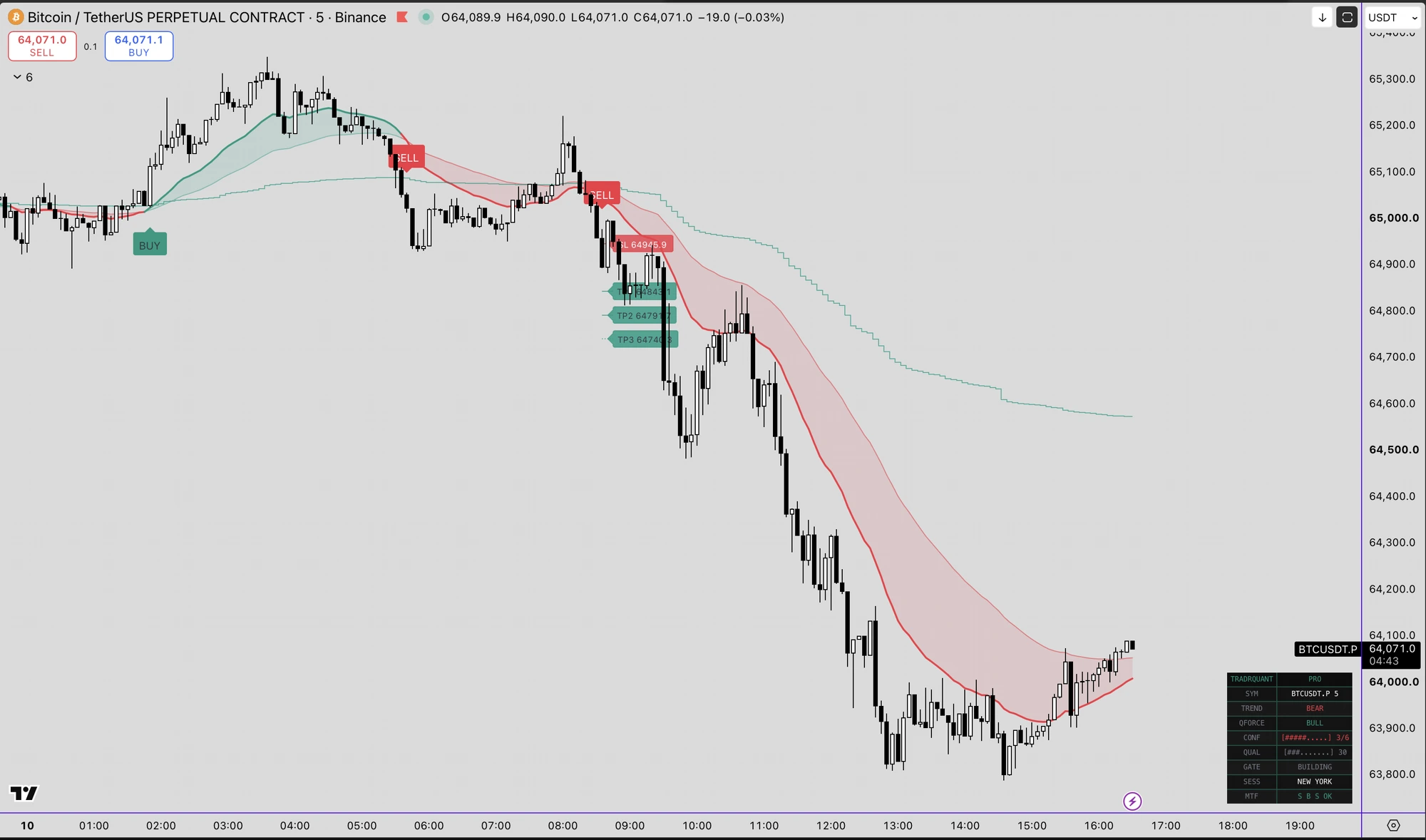
See it on the chart
Premium (Φ) confluence signals as they print live — both gates in agreement on the closed bar. Illustrative examples for education; not a performance claim.
What this is
TradrQuant Pro is a free confluence terminal built on the same core logic our internal research desk uses to construct trade ideas: layered trend confirmation, adaptive momentum, independent quality filtering, and multi-timeframe context — all visible, all on confirmed candle closes, nothing hidden behind a proprietary "AI score."
This isn't a plug-and-play black box. It's a research tool. Load it, study how the components interact, and tune it to the instrument and timeframe you actually trade. The parameters are exposed because they're meant to be used.
The engine
A fast/slow EMA ribbon (21/50 default) plus a 200-EMA major trend filter. This is your directional bias layer: the foundation everything else builds on.
An adaptive baseline built on Kaufman's Efficiency Ratio. It accelerates and hugs price during strong directional moves, and flattens during chop — reacting to the character of the move itself rather than a fixed lookback. Wrapped in an ATR envelope, a directional flip only confirms after a configurable run of consecutive closes beyond the band, filtering out single-candle noise before it ever reaches the confluence layer.
Six independent structural checks: EMA trend direction, major trend alignment, Quant Force direction, RSI momentum side, volume expansion, and non-overextension against the Reversal Bands. A setup needs a minimum score before it's even eligible.
A second, fully independent gate: momentum strength, volume ratio versus average, candle body-to-range ratio, and baseline efficiency. This measures how clean the move is, separate from which direction it's in — a dual-gate structure, not a single blended number.
Cross-checks trend alignment across three configurable higher timeframes (default 1H / 4H / Daily) using the same EMA logic as the primary chart. Can be required for a setup to fire, or simply displayed for read-only context.
Enforces a minimum bar spacing between setups, so a choppy session can't spam repeated triggers off the same move.
A trade setup only prints when trend, momentum, quality, and — if enabled — multi-timeframe context all align. Every check runs exclusively on confirmed candle closes. Nothing repaints.
How to actually trade the setups
This section matters more than any single parameter. The dashboard and the chart are built to be read together, not in isolation.
The fast/slow EMA ribbon is your directional filter before anything else. As a baseline rule: favor long entries only while price is trading above the ribbon and the cloud is coloring bullish (fast EMA above slow EMA). Favor short entries only while price is below the ribbon and the cloud is bearish. Trading against the ribbon's current color is counter-trend by definition — treat those setups, if you take them at all, as lower-conviction, tighter-risk plays, not your core approach.
Price closing beyond the ATR envelope in the direction of a fresh Quant Force flip is your momentum confirmation layer, sitting on top of the ribbon. When the baseline, the envelope flip, and the ribbon direction all agree, that's the strongest form of trend alignment the engine can show you.
A printed BUY only appears when the confluence score, quality score, and (if enabled) MTF agreement all clear their thresholds simultaneously — it is the culmination of every layer above, not a standalone trigger. The same applies to SELL, mirrored to the downside. Treat every printed setup as a starting point for your own trade construction, not an instruction to execute blindly.
Before acting on any setup, glance at the panel: CONF shows how many of the six confluence checks are currently satisfied, QUAL shows the 0–100 quality reading, GATE shows ARMED or BUILDING, and MTF shows the letter-by-letter breakdown across your three higher timeframes. A setup backed by a high CONF score, a QUAL reading comfortably above your threshold, and full MTF agreement (all letters matching direction) is structurally stronger than one that just barely cleared the minimum bar.
Supply/Demand and Support/Resistance zones are context, not entry signals on their own. A BUY setup that prints at or just above a demand zone is meaningfully stronger than the same BUY setup printing in open air with no nearby structure. Use the zones to grade the setups the engine gives you, not to generate new ones independently.
On intraday timeframes, treat price trading above the anchored session VWAP as a bullish bias filter and below it as bearish. A BUY setup above VWAP and a SELL setup below VWAP are both trading with the day's volume-weighted flow rather than against it.
Every setup draws a full SL, TP1, TP2, and TP3, all derived from live ATR rather than fixed points. A disciplined starting framework: scale a portion of size off at TP1, move your stop toward breakeven once TP1 is tagged, and let the remainder work toward TP2/TP3. The stop-loss level is not a suggestion — respect it as your hard risk boundary regardless of conviction.
Starting parameters by asset class
There is no universal parameter set that outperforms everywhere — treat every value below as a forward-testing starting point tuned to the volatility profile of that asset class, not a proven optimization.
| Asset Class | Fast/Slow EMA | Quant Force Length | Confirmation Closes | Min Confluence | Min Quality | MTF Checks |
|---|---|---|---|---|---|---|
| Crypto majors (BTC, ETH perps) | 21 / 50 | 34 | 2 | 5/6 | 65 | 1H / 4H / D |
| Crypto alts (higher volatility) | 13 / 34 | 21 | 2–3 | 5/6 | 70 | 1H / 4H / D |
| Indices / Futures (ES, NQ, US30) | 21 / 50 | 34 | 1–2 | 4/6 | 60 | 15m / 1H / 4H |
| Forex majors | 21 / 55 | 40 | 2 | 5/6 | 65 | 4H / D / W |
Why these differ: alts and lower-cap crypto move sharper and noisier, so a faster EMA pair paired with a higher quality bar filters false starts more aggressively. Indices trend more smoothly intraday, so a shorter MTF stack (15m/1H/4H) stays relevant to how index traders actually operate. Forex moves in slower, cleaner sessions, so a longer Quant Force length and a higher-timeframe MTF stack (4H/D/W) fits its rhythm better than crypto's faster cadence.
Input parameters
Every input is exposed for a reason. Here is what each one does and how it affects signal frequency and quality. Defaults may change between script versions.
| Input | Type | Description |
|---|---|---|
| Fast / Slow EMA | Integer | Lengths of the Trend Cloud ribbon (default 21 / 50). Faster pairs react quicker on noisier instruments. |
| Major Trend EMA | Integer | The 200-EMA directional filter — your top-level bias layer. |
| Quant Force Length | Integer | Lookback for the adaptive Kaufman's Efficiency Ratio baseline. Longer = smoother regime read. |
| ATR Envelope | Multiplier | Band width around the Quant Force baseline used to confirm momentum flips. |
| Confirmation Closes | Integer | Consecutive closes beyond the band required before a Quant Force flip confirms — filters single-candle noise. |
| Min Confluence Score | 0–6 | Minimum of the six confluence checks a setup must satisfy before it is eligible to print. |
| Min Quality Score | 0–100 | Minimum quality reading required — the independent second gate. |
| Multi-Timeframe Checks | 3 × TF | The three higher timeframes cross-checked for trend agreement; require for a setup to fire or display read-only. |
| Anti-Cluster Cooldown | Bars | Minimum bar spacing enforced between setups so chop can't spam repeated triggers. |
| Zones & Session VWAP | Toggles | Supply/Demand + Support/Resistance context and the anchored intraday VWAP bias filter. |
| TP/SL Suite | ATR-derived | Full SL, TP1, TP2 and TP3 levels drawn from live ATR rather than fixed points. |
| Alerts | alertcondition | Native TradingView alert hooks for setups so you can route notifications to app, email or webhook. |
Alerts & how to add it
Setups expose native TradingView alertcondition hooks, so you can push them to the TradingView app, email or a webhook.
- 1Open the TradrQuant Pro script on TradingView and click “Add to favourites”.
- 2On your chart, open the Indicators panel, go to Favourites and add TradrQuant Pro.
- 3Open Settings to configure the ribbon, Quant Force length, confirmation closes, confluence & quality thresholds and multi-timeframe checks.
- 4Click the Alert (clock) icon, choose TradrQuant Pro as the condition and select the setup you want.
- 5Choose your notification method (app / email / webhook) and create the alert.
Take advantage of it
This is free, it runs a meaningful slice of the same core logic our research process leans on, and every input is exposed for a reason — go load it on your own charts, across your own instruments, and actually tune it. The defaults are a starting point, not a finish line.
Frequently asked questions
Does the TradrQuant Pro indicator repaint?
No. Every check — trend, momentum, confluence, quality and multi-timeframe — runs exclusively on confirmed candle closes, so a printed setup never moves or disappears afterwards. What you see historically is what you would have seen live.
Is the TradrQuant Pro indicator free?
Yes. TradrQuant Pro is a free confluence terminal on TradingView. It runs a meaningful slice of the same core logic our research process leans on, and every input is exposed for you to study and tune.
What is the difference between the Confluence Score and the Quality Score?
It's a dual-gate structure, not a single blended number. The Confluence Score (0–6) measures how many structural conditions agree on direction; the Quality Score (0–100) is a fully independent gate measuring how clean the move is — momentum strength, volume ratio, candle body-to-range and baseline efficiency. A setup must clear both.
What markets and timeframes does it work on?
It is market-agnostic and works on any TradingView symbol and timeframe — crypto, indices/futures or forex. The starting parameters differ by asset class because volatility profiles differ; treat every value as a forward-testing starting point, not a proven optimization.
How should I trade a printed BUY or SELL setup?
As a starting point for your own trade construction, not an instruction to execute blindly. Read the dashboard (CONF/QUAL/GATE/MTF), grade the setup against nearby zones and Session VWAP, respect the ATR-derived stop as a hard risk boundary, and manage the TP1/TP2/TP3 suite with discipline.
Is this financial advice?
No. The indicator is an educational and analytical tool. It identifies technical confluence — it does not constitute financial advice. Past patterns, however consistent, do not guarantee future results. Always manage your own risk.
Get the free indicator
Add TradrQuant Pro to your TradingView charts in one click — no cost, no account tier required.
Add on TradingViewThis indicator is an educational and analytical tool. It does not constitute financial advice. Past patterns, however consistent, do not guarantee future results. Always manage your own risk.